Shopping Cart






Your store already has the data – turn it into useful answers
Which brand generates the most revenue? Which products deliver a real margin? What is the average order value in Germany? Do new customers return within 90 days? Which products are purchased together, and which coupons generate revenue?
PrestaShop Sales Analytics processes your store’s order data through 16 detailed reports. Results can be filtered, sorted, visualised and exported in full as CSV files.
This gives purchasing, marketing, pricing and management decisions a foundation in actual store data instead of guesswork.
16 sales reports in 5 clear groups
Sales and profitability
- 1. Brands: orders, units sold, net product revenue and gross product revenue by brand.
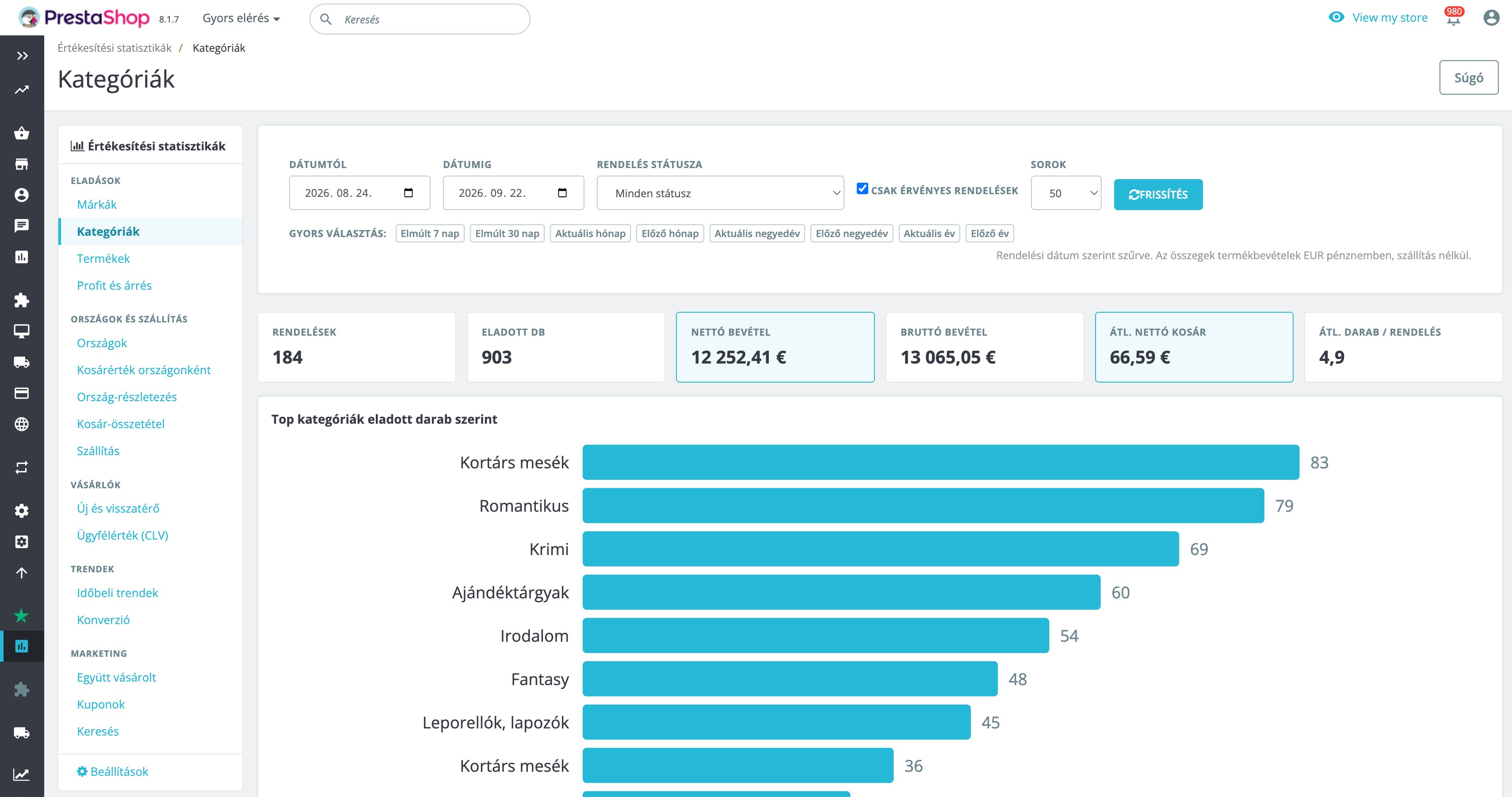
- 2. Categories: sales performance by product category, including orders, quantity and revenue.
- 3. Products: product-level sales with reference, brand and direct links to the storefront and product editor.
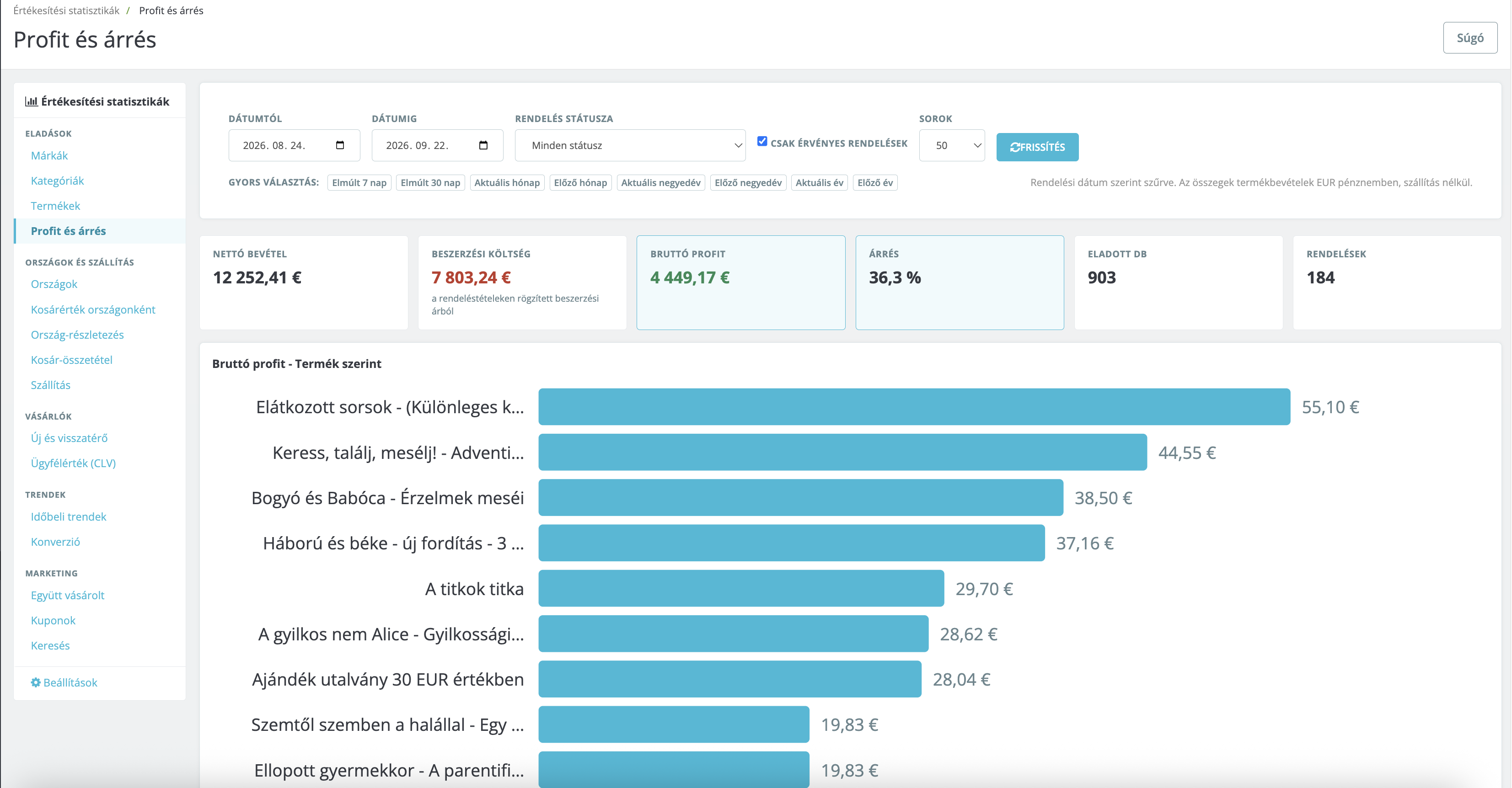
- 4. Profit and margin: revenue, purchase cost, gross profit and margin by product, brand or category, calculated from the wholesale price recorded on each order line.
Countries and shipping
- 5. Countries: orders, revenue and purchasing performance based on the country of the delivery address.
- 6. Average order value by country: compares the average value of orders between different countries.
- 7. Country details: shows the most popular products and categories within a selected country.
- 8. Basket composition: shows the percentage of orders in which each category appears within a selected country.
- 9. Shipping: shipping cost as a percentage of order value, free-shipping rate, breakdown by order-value range and country, and orders with the highest shipping costs.
Customers
- 10. New and returning customers: customer count and revenue for new and returning customers, repeat purchase rates within 30, 60 and 90 days, and country-level breakdowns.
- 11. Customer lifetime value: average and median CLV, revenue share of the top 5, 10 and 20 per cent of customers, and a list of the most valuable customers.
Trends and purchasing behaviour
- 12. Time-based trends: monthly, weekly and day-of-week sales breakdowns.
- 13. Conversion: average order value, orders per customer, cart abandonment calculated from registered customer carts, and monthly AOV trends.
Marketing
- 14. Frequently bought together: the product and category pairs that most frequently appear in the same order.
- 15. Coupons: the share of discounted orders, total discounts granted, and usage and revenue by cart rule.
- 16. Search: customer search terms and searches without results, based on PrestaShop search statistics.
Consistent filtering across every report
- 📅 Custom date range with quick selections for the last 7 or 30 days, current or previous month, quarter or year.
- ⚙️ Order-status filtering to analyse completed, delivered or any other selected order states separately.
- ✅ Valid orders only option for excluding orders not considered valid by PrestaShop.
- 🧾 Order or invoice date as the time basis of each report.
- 🏪 Multistore support: reports automatically follow the shop context selected in the PrestaShop back office.
Clear results inside the back office
- Summary cards: the most relevant metrics are displayed at the top of every report.
- Built-in charts: visual comparison of the leading results without loading an external script.
- Sortable columns: order report tables by the metrics that matter to you.
- Pagination: keeps reports manageable even with large datasets.
- Bookmarkable URLs: reopen a configured report and its filters directly.
- Permissions by report tab: use Team → Profiles to control which reports each employee can access.
Complete CSV export for Excel
The module exports the entire filtered report, not only the rows currently visible on the page.
- UTF-8 BOM for correct handling of international characters;
- selectable semicolon or comma delimiter;
- support for decimal commas;
- Excel-friendly file structure;
- protection against CSV formula injection.
Practical examples
- 📦 Purchasing: “Which brand sold the most during the previous quarter?” – open the Brands report, select the previous quarter and export the results for the supplier.
- 🌍 International sales: “What are the 15 best-selling products in Germany, and what is the average order value?” – use Country details and Average order value by country.
- 🛒 Cross-selling: “Which products are regularly purchased together?” – use the Frequently bought together report.
- 💰 Pricing: “Which brand or category actually delivers a margin?” – use the Profit and margin report.
- 🚚 Shipping: “For which countries or order values is shipping disproportionately expensive?” – use the Shipping report.
- 👥 Customer retention: “Do new customers return within 30, 60 or 90 days?” – use the New and returning customers report.
- 🎟️ Promotions: “Which coupon generated actual revenue?” – use the Coupons report.
How are the figures calculated?
- All monetary values are displayed in the store’s default currency and number format.
- Foreign-currency orders are converted using the exchange rate recorded with the order.
- Product revenue is calculated from order-line totals without shipping charges or order-level discounts. This provides a consistent comparison basis for products, brands and categories.
- The Profit and margin report uses the wholesale price recorded on each order line. Profit figures cannot be complete where no purchase price was recorded.
- Cart abandonment is calculated from saved carts belonging to registered customers. It is not a complete website conversion rate covering all anonymous visitors.
- The Search report uses data collected by PrestaShop’s Search engine keywords statistics module.
Compatibility and data handling
- PrestaShop: 1.7.8+, 8.x and 9.x
- PHP: 7.2–8.4
- Multistore: supported according to the selected shop context
- Back-office languages: English and Hungarian
- Themes: theme-independent because the module operates only in the back office
- Overrides: none
- External account: not required
- External scripts calling: none
- Custom database tables: none; reports are calculated from existing PrestaShop data
Uninstalling the module does not delete order or customer data.
Installation and use
- Upload and install the module through the PrestaShop back office.
- Open Statistics → Sales Analytics.
- Select a report and date range – the module is ready to use immediately after installation.
- Optionally configure the default period, date type and CSV delimiter on the module settings page.
Updates, licence and support
Each licence is valid for one online store and includes one year of updates and support. Updates are installed by Webstart Updater from digitally signed packages.
The module does not transmit customer data or load external tracking code or scripts. For licence validation, it sends only the module version and the store domain to the licence server.